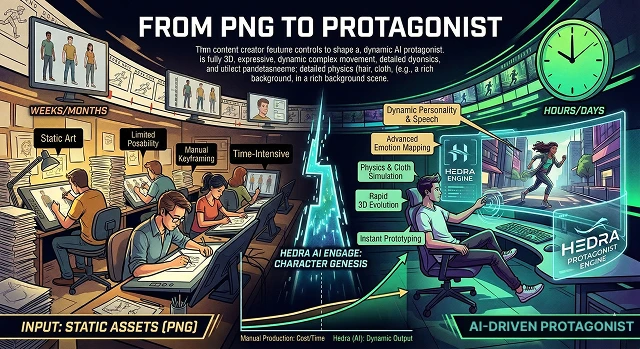
Here’s a full breakdown of this process in “human language,” or the step-by-step progression from the technical side of creating an AI character through to the creative spark that brings them to life.
1. The Starting Point: The ‘Static’ PNG
In the world of AI video creation, the static PNG (where PNG/JPEG represent the format of flat images) is just a “flat” or frozen moment in time. It could either be a photo of a person, cartoon character, 3D-rendered person, or other analog-type person:
- No Voice: A static PNG-type image has no voice. A static PNG-type image has an inability to talk.
- No Movement: A static PNG-type image has no movement. For example, a static PNG-type image cannot blink, move its head, or express any type of facial expression.
- No Story: A static PNG-type image has no story. It is simply a "setpiece."
2. The Transformation: Making them a "Protagonist"
Transforming an image to: "make it into a Protagonist" requires the use of AI-based tools (often referred to as Hedra) to provide the PNG with human-like characteristics. This is accomplished at three levels:
- Voice (Audio): An audio file can be uploaded and/or text can be typed for an AI to produce speech - this provides the PNG with a "soul" and a personality.
- Rigging (Animation): The AI will recognize where the PNG has a face, specifically where the eyes, mouth and chin would be & then will use that info to "animate" them in sync with the audio (e.g., lip-synch).
- Emotion (Performance): To be a true protagonist, the character does not only act verbally (through speech), but also will physically (e.g., micro-expressions: raised eyebrows, slight smile, or pensive gaze).
3. Why this is important to Creators
This concept revolutionizes digital storytelling because:
- Low Cost / High Production: No need for a film crew or expensive animator - all that is needed is a well-designed image and script.
- Consistency: You can use the same PNG (the "Protagonist") in 100s of video, resulting in creating a "virtual influencer" or brand mascot that comes to capture the attention of audiences.
- Speed: You can go from concept to completed "scene" within minutes.
4. "PNG" Anatomy (Static Phase)
- Picture a wax mannequin. It looks nice, but is stationary. Total lack of agency means it can't interact with what's going on in the world.
- Sometimes you see a still picture of a human and think "something feels off" because there is no movement in the eyes or shift in body weight.
- In gaming or web design, the PNG is just a placeholder character—a character that will not affect the game or story.
| ID | Evolutionary Stage | From Static Asset to Living Performance |
|---|---|---|
| PT-01 | Depth-Map Inference |
The 3D Forge analyzes your PNG to create a "Z-buffer," identifying which facial features are foreground and which are background. Volumetric Estimation |
| PT-02 | Latent Rigging | Invisible skeletal points are mapped to the PNG's eyes, mouth, and neck, allowing for fluid motion without manual keyframing. |
| PT-03 | Vocal Embodiment |
The character’s "personality" is locked in as the AI synchronizes the 3D mesh movements with the emotional pitch of the audio. Affective Computing |
| PT-04 | Temporal Coherence |
Ensuring that the character looks consistent frame-by-frame, preventing the "flicker" that usually plagues AI-generated imagery. Seed Stabilization |
| PT-05 | The Hero Render | Final 4K export where the PNG is no longer just a picture, but a fully-realized protagonist ready for your cinematic project. |
Submit Your Application
Complete the form below to initiate your AI video generation project.
5. Turning Into a Protagonist (Transition Phase)
Once that statue has the three layers of humanity, it is now a protagonist. Three layers are needed:
- Voice [Soul]: This character needs to be heard! When you give it a text-to-speech voice (TTS) or upload a voice recording, this character has a voice, accent and attitude.
- Mouth Motion [Connection]: This is where the magic happens. The AI "maps out" mouth pixel movement to the phonetic sounds of the voice. If the audio sample says "Hello", the PNG's mouth makes an "H" sounds signified by mouth movements.
- Micro-Expressions [Life]: A character cannot be robotic. It must squint when confused.
6. Reasons This Will Be a Creator "Revolution"
Creating a "PNG" representing a "main character" previously took an enormous amount of time to professionally animate with multiple people working together on it. Now, it's not just affordable; it's also universally accessible to anyone else too.
- The "One-Person Production House": A single image is all that is required to create an entire series with just one person.
- Speed of Thought: Have an idea for a character at 2:00 pm and be able to have that character "audition" for a part in a video at 2:05 pm.
- Consistency: Use the same PNG over and over in different "scenes" (with different sounds) to continue establishing a solid brand identity/mascot without having to recreate each piece.
7. The "DNA" of the Transformation
To go from a file (PNG) to a lead character (Protagonist), the AI performs three heavy-duty tasks simultaneously:
- Semantic Mapping: The AI "looks" at your PNG and identifies what it is. It doesn't just see pixels; it recognizes "This is a nose," "This is a shadow," and "This is a jawline."
- Temporal Consistency: This is the hardest part. If the character turns their head, the AI has to "invent" what the side of their face looks like based on the front. It ensures the character stays the same person from second 1 to second 30.
- Phonetic Syncing: The AI breaks down your audio into "phonemes" (the smallest units of sound). It then pulls the pixels of the PNG's mouth into specific shapes ($visemes$) to match those sounds perfectly.
From PNG to Protagonist
How to turn any simple image into a hero ready for the big screen.
Yes! When you upload a PNG or JPG, our AI analyzes the facial landmarks. It builds a hidden 3D structure behind the image, allowing it to move and talk as if it were a high-end animation.
The AI loves clarity. For best results, use an image looking directly at the camera with the mouth closed. Once the AI has a clear "map," it can handle complex expressions.
Absolutely. This is a "Power User" move. Create a character in another AI tool, save it as a PNG, and bring it here to give it a voice without ever needing 3D modeling skills.
We recommend using Portrait Mode (blurred background). This helps the AI focus its "brain power" on the character's face, making the motion look much smoother and more professional.
Even better! A transparent PNG allows you to export your talking character as an overlay. You can then drop your protagonist into different "scenes" (like a spaceship or city) later.
Definitely. Whether it's a robot, alien, or stylized creature, as long as the image has a recognizable face (eyes and a mouth), the AI can work its magic. Perfect for sci-fi or fantasy lore.
The secret is Character Seeding. Use the exact same PNG as your "base" for every video. This ensures your protagonist maintains the same face, lighting, and "vibe" across every episode.
Our AI recognizes accessories and hair flow well. For the best look, try to ensure the eyes are visible so the character can properly "connect" with your audience.
Yes! You can take a museum painting or pencil sketch and make it talk. The AI adapts to the art style, preserving the fluid feel of paint or the raw energy of a sketch.
This happens if the source PNG was low resolution. Use an image at least 1024x1024 pixels. If it’s still soft, the "4K Upscale" button will sharpen it right up!
Ready to try Hedra?
Transform your ideas into cinematic video in seconds.