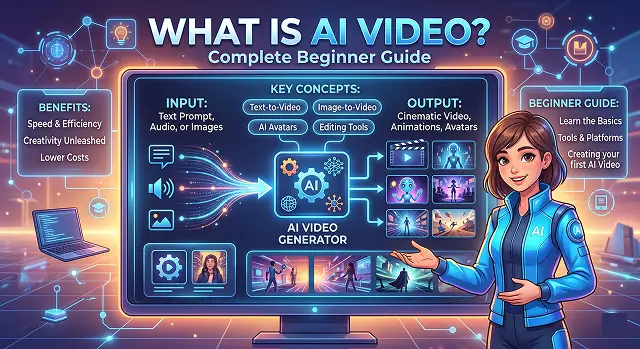
Welcome to the world of AI video! In 2026, we’ve moved past the era of "weird, glitchy faces" and into a time where anyone with an idea can create a cinematic clip in seconds.
Here is your complete beginner’s guide, written for humans, not robots.
1. What is AI Video ?
AI Video is basically video content that Artificial Intelligence creates, or heavily edits, by using omnipresent existing media instead of having a human-powered crew to produce the content.
- To further explain: Rather than hiring a director, camera operator, and editor, you are now the “Prompt Engineer” and you give AI an instruction which will display itself as the images created by the AI all based off of millions of images and videos the AI has been trained on (like: “A golden retriever in a tuxedo, at an upscale gala”).
2. So How Do They Do It?
There’s an unbelievable amount of “magic” here, but really only “magic” at 3 steps or stages:
- Understanding (NLP): AI uses your text prompt to understand the content ie. Who is the person? What is going on? Where is it happening?
- Generating (Diffusion or GAN): The AI generates frames (or sequential images) to visually represent the concept described in the text.
- Consistent motion: AI will ensure that the same dog (frame 1) looks the same dog (frame 100) and that all motions are realistic, whether walking or waving.
The Four Main AI Video Types
Methodology Overview · 2026 Edition
| Type | What it does | Best For... |
|---|---|---|
| Text-to-Video | Type a sentence; get a video. | Quick social media clips or concepts. |
| Image-to-Video | Upload a photo and make it move. | Bringing old family photos or AI art to life. |
| AI Avatars | A digital "talking head" speaks your script. | Training videos, corporate news, or YouTube. |
| Video-to-Video | Record yourself and "re-skin" it (e.g., turn yourself into a 3D cartoon). | High-end visual effects without the cost. |
3. Popular Tools for Beginners (2026)
If you're excited about diving into it today, these are the leading tools.
- Google Veo / Sora: The "gold standard" for cinematic, high-quality realism.
- Runway (Gen-4.5): Great for creators who want professional control (panning, zooming, and motion brushes).
- Luma Dream Machine: Known for being very fast and great at understanding complex physics.
- HeyGen / Synthesia: The go-to tools if you need a digital person to stand there and talk to the camera.
4. Pro Tips for Your First Video
- Be Explicit: Don't simply say "Car" say "Antique red Porsche cruising down a neon-lit Tokyo street during the night at a resolution of 4K with cinematographic lighting."
- Length of Clip: The majority of AI will perform optimal performance, if, most clips are between 3 - 10 seconds and can then be pieced together later on.
- Use a Reference: If you are going to have your character from scene to scene, always use the same reference picture to keep the AI from changing the character's image.
5. A Quick Reality Check (Ethics)
While AI video can be incredibly powerful, it also has the responsibility for the user.
- Deepfake Videos: Creating a deepfake of someone is incredibly simple, allowing anyone to create video footage of anyone at any moment. Most social media firms also have defined polices barring any form of video of another individual without prior consent.
- Watermarks: Most 2026 tools (like Google's Lyria or Veo) automatically include "invisible" watermarks to show a video was made by AI. This helps keep the internet a bit more honest!
Submit Your Application
Complete the form below to initiate your AI video generation project.
How the "Magic" Happens (The 2026 Tech)
Modern AI video isn't just guessing what the next frame looks like. It uses World Models. These models (like Sora 2 or Veo 3) actually understand physics—if a glass falls in the video, the AI "knows" it should shatter and that liquid should splash realistically.
The Content Pipeline
Most creators now follow a "Node-Based" or "Agentic" workflow:
- The Idea: You talk to an AI Agent (like Genra or LTX Studio).
- The Script/Storyboard: The AI breaks your idea into specific "shots" (Wide, Medium, Close-up).
- Generation: The AI produces the clips.
- Identity Anchoring: You use a Hero Image (a master reference of your character) to ensure the person looks the same in every single shot.
Advanced Styles & Control
As a beginner, you aren't stuck with just typing text. You have "Directorial" controls:
OpusClip: Specifically designed to turn long YouTube videos into TikToks/Shorts.
- Motion Brushes: You may paint any single element of a postcard (for instance, only paint the water in a waterfall) and have the AI animate Only the item you painted.
- Camera Choreography: You may direct specific camera movements to add production quality to your video; for example; "Dolly zoom", "pan left", or "overhead shot".
- Lip-Sync & Audio: Tools like HeyGen or Kling now generate native audio. This means the characters' lips move perfectly in sync with the dialogue the AI also generated.
Ethics & The "Watermark" Era
In 2026, most platforms have moved toward Transparency.
- C2PA Metadata: This is a digital "nutrition label" attached to your video file that tells viewers it was made with AI.
- Deepfake Protections: Most reputable tools will block you from using the likeness of celebrities or politicians without authorization.
What is AI Video?
A beginner’s guide to the future of visual storytelling.
Not exactly! While filters just change the "look," AI Video is generative. The computer builds frames from scratch based on your instructions. It’s like having a painter who draws 30 new pictures every second to make them move.
It uses Neural Mapping. The AI understands the relationship between sounds and mouth shapes. When you provide audio, it simply "re-imagines" your character's face following those same phonetic patterns.
That's the best part—your brain is the studio. Since the video is created in the cloud, you don't need lights or expensive lenses. All you need is an idea, a script, and a basic laptop or phone.
While they use similar tech, the intent is different. AI Video Creation is an artistic tool for making new characters, educational content, and stories. It’s about creating something original, not faking something real.
The sky is the limit! People use it for faceless channels, personalized messages, corporate training, animated memes, or even indie short films. If you can imagine it, AI can help you put it on screen.
In a way, yes. Modern AI tools analyze the inflection and tone of your audio. If you sound sad, the AI looks for facial patterns that match—like drooping eyes. It’s not "feeling" the emotion, but it’s an expert at mimicking human visual cues.
This is the Uncanny Valley. It happens when animation is almost perfect, but the brain misses tiny details like micro-blinks. As models evolve, they are learning to include these "imperfections" to make videos look more authentic.
You are Directing through Text. By specifying "dramatic shadows" or a "slight smile" in your prompt, you give the AI a specific creative path. You are the conductor, and the AI is your high-speed neural orchestra.
Think of it as an Evolution. Traditional animation takes months; AI allows for rapid prototyping. Animators now use AI to test ideas quickly, then apply their specialized skills to polish the final product.
The most important skill is Visual Literacy. Since AI handles the "math," you need to focus on composition, lighting, and storytelling. Knowing what looks good and how to describe it is the new superpower for 2026 creators.
Ready to try Hedra?
Transform your ideas into cinematic video in seconds.