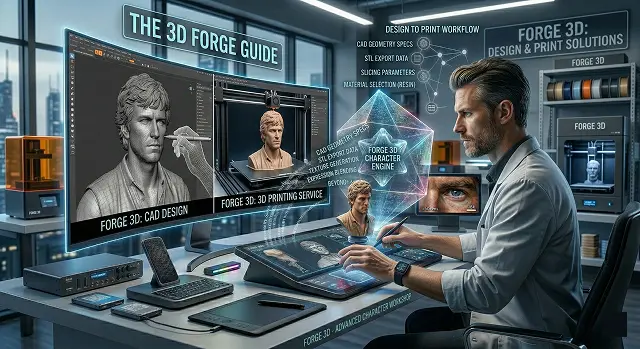
Here’s what to expect from the guide broken down into five different sections containing the overall process for creating a product with 3D Printing :
1. Design Phase (CAD)
The beginning of every project starts here. You will learn that you create a geometric three-dimensional model from a mathematical point rather than creating a 2D diagram.
- Welded Geometry: In order to be printable, the model must consist of a single structure (manifold). In order for the printer to be able to identify what is outside vs. inside of the structure, the model must not have holes where they can leak (water) through.
- Model Geometry Density: It’s physically impossible to print an object that has no density (i.e.: infinitely thin). You will learn that a minimum density (the same thickness as a piece of paper) is usually needed in order to remain strong.
- Gravity & Weights: 3D printed products are very similar to stacks of Legos – products created in this manner will be weakest directly where the part (layer) contacts with the previous layer. The guide will assist you (the designer) on how to position the parts on the printer bed in the most efficient manner.
2. The Slicing Phase (the bridge)
Your 3D printer does not know how to read a 3D file (like an .STL or .OBJ) without a “Slicer.”
- Layer Height: Thinner layers create an even more polished look but will take longer to print.
- Infill: Most of your parts will be printed hollow (this saves on the use of plastic). The guide demonstrates how you can achieve hollowness using interior patterns, such as honeycombs or grids, to keep your parts strong while minimizing waste.
- Supports: The guide explains how to add temporary "scaffolding" for overhanging areas of your prints since the printer does not know how to print onto thin air.
3. Technology & Material
The guide explains the different types of 3D printers:
- FDM (Plastic Strings): This type of printer uses a spool of plastic filament and is very affordable. This type is great for functional parts such as brackets or toys.
Materials:
The guide covers three common types of materials.
- PLA: Made from cornstarch and easy to use; however, it will melt in a hot car.
- PETG: This is the ideal material in strength and heat resistance.
- ABS: This material creates very durable parts; however, it has an unpleasant odor (like burning plastic), and requires a heated chamber to create parts.
4. The Forge Philosophy: Working with Metal
A professional 'Forge' approach concentrates on designing parts to be manufactured and assembled using a method known as DFMA (Design for Manufacturing and Assembly).
- Tolerances: To have two parts fit together, for example, a bolt & nut, the two pieces must be slightly different sizes to allow for a small air gap (usually 0.2mm) between the pieces to prevent them from being fused together.
- Post Processing: Real-world processes that include sanding, painting, and applying chemicals to make a 3D print look like a commercially available product.
| ID | Forge Operation | Technical Execution & Best Practices |
|---|---|---|
| FG-01 | Latent Sculpting |
Using the Character-3 model to interpret 2D pixel data into a depth-mapped 3D mesh with accurate skeletal proportions. Omnimodal Processing |
| FG-02 | Phoneme Mapping |
Synchronizing the lip-sync engine with vocal audio to ensure that "Hard Consonants" (B, P, M) trigger accurate mouth closures. Vocal-Geometry Sync |
| FG-03 | Skeletal Weighting | Adjusting how much the neck and shoulders move in relation to head tilt. Lower weighting creates a stable newsreader aesthetic. |
| FG-04 | Gaze Stabilization |
Locking the character's eye-line to a "Camera Target" to prevent the wandering look common in early AI renders. Target Tracking |
| FG-05 | Asset Finalization | Final pass for skin-subsurface details and environmental light wrapping before pushing to the 4K High-Res Upscaler. |
Submit Your Application
Complete the form below to initiate your AI video generation project.
5. Designing for "Success" (Not Just Looks)
In the hobby world, you just want it to look cool. In the "Forge" world, you design so the part actually works.
- The 45° Rule: The guide emphasizes that 3D printers can’t print on thin air. If an angle is steeper than 45 degrees, you need supports. Pro designers try to "chamfer" (angle) edges so they support themselves, saving time and plastic.
- Fillets vs. Chamfers: A "fillet" (curved corner) makes a part much stronger by spreading out stress. A "chamfer" (flat angled corner) is better for the very bottom layer because it prevents "Elephant’s Foot" (where the first layer squishes out and makes the part hard to remove).
6. Advanced Slicing (The "Brain" of the Print)
This is the step where you turn your 3D model into "G-Code" (the instructions for the motor).
- Variable Layer Height: The guide explains that you don't have to use the same resolution for the whole part. You can use thick layers for the "boring" vertical walls to save time, and thin layers for the "detailed" curvy top to make it look smooth.
- Shells vs. Infill: To make a part stronger, the guide advises adding more "walls" (shells) rather than just more "stuffing" (infill). Three or four walls are usually stronger than a 50% solid middle.
- Bridging: This is the "magic trick" where a printer pulls a line of plastic across a gap like a tightrope. The guide teaches you how to tune your cooling fans to "freeze" that plastic mid-air so it doesn't sag.
7. The Material "Toolbox"
Professional guides move beyond basic plastic. They focus on Functional Materials:
- TPU (The Rubber): It’s flexible. The guide explains that you have to print this very slowly, or it will tangle in the gears like a wet noodle.
- Carbon Fiber Infused: These are plastics mixed with tiny bits of carbon. They are incredibly stiff and don't warp, making them the "gold standard" for tools and car parts.
- ASA: Like ABS (Lego plastic), but UV-resistant. This is the material the guide recommends if your part is going to sit outside in the sun.
8. Post-Processing (The Professional Finish)
A print isn't "done" when the machine stops.
- Support Removal: The guide shows you how to use needle-nose pliers and dental picks to snap off "scaffolding" without scarring the part.
- Annealing: For some plastics, you can actually "bake" them in an oven at a low temperature after printing. This realigns the molecules and makes the part much more heat-resistant.
- Vapor Smoothing: For certain materials, you can use a chemical mist to melt the outer "lines" away, leaving a part that looks like it was injection-molded in a factory.
The 3D Forge Guide
Everything you need to know about bringing your own custom characters to life.
Think of the 3D Forge as a digital clay studio. Instead of picking from pre-made people, you describe exactly who you want. The AI "sculpts" a 3D model from scratch—face, body, and clothes—that you can animate however you like.
Not at all! If you can describe it in words, you can build it. Type a prompt like "A futuristic knight in chrome armor," and the Forge handles the artistic heavy lifting for you.
Every character comes with built-in digital rigging. They are ready to dance, walk, or talk instantly. You can record your own face via webcam to control theirs, or simply type in the actions.
Yes! You can download your creation as a .GLB or .FBX file. These work perfectly in Roblox, Unity, or Unreal Engine, allowing your AI character to become a playable hero.
Definitely. Characters stay in your Personal Vault. You can bring them into new projects, change their outfits for new scenes, or have them meet other characters you've built.
If you upload a clear face photo, the Forge will map those unique features onto your 3D character to give them a familiar, consistent look.
Use the digital wardrobe. Click the "Outfit" tab and type a new description. The AI "re-wraps" the new clothing onto your character’s body while keeping their identity intact.
Absolutely! You can build mechs, aliens, or creatures. As long as they have a head and limbs, the AI can build a skeleton for them to walk and talk.
Basic plans have limited slots, but Pro and Ultra plans offer unlimited slots. Build an entire cast for your movie and keep them forever.
A basic character is ready in about 2 minutes. High-detail 8K versions may take 5 to 10 minutes. It's revolutionary speed compared to traditional modeling.
Ready to try Hedra?
Transform your ideas into cinematic video in seconds.