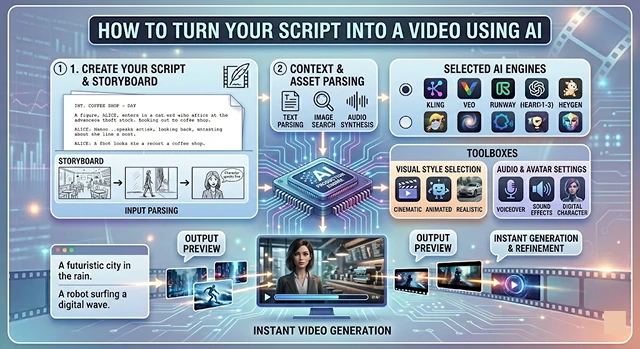
Turning a script into a polished video used to require a production crew; now, it requires a logical stack of AI tools. The process has shifted from "filming" to "orchestrating" assets.
Here is the most efficient workflow to go from a text document to a finished video.
1. The Script: Refinement & Formatting
Your AI Video Will Be As Good As The Prompt! If You Have A Raw Script, Tweak It Up Using A Large Language Model LLM To Suit The Format Of The Video You Are Delivering It In.
- For Social Shorts Or Reels: You Will Want To Ask For A Hook First 3 Seconds And Make Sure There Are Fast Transitions.
- For Explainer Video: Ask For A Dual Column Script Visuals Left Audio Right.
- Human Touch: Ask The AI To Write This In A Conversational Tone And Use Contractions (It’s, Don’t, etc.) And Use A Variety Of Sentence Lengths Which Will Create A Less Robotic Sound.
2. The Narrative: AI Voiceover
Don't rely on the pre-installed robotic audio in standard text editors; instead, use high quality A.I. Audio creation tools like eleven labs, that provide generative media capabilities for mimicking human breathings, pauses and emotional vocal inflections when creating audio content.
- Tip: In the event of a pronunciation error with an AI tool, try spelling out the phonetics of the word (e.g.; switch the word A-I to be pronounced as A-eye).
- Cloning: If you would like to create your own brand voice, you can do so by uploading 30 seconds of your recorded voice.
The Visuals: Three Main Paths
AI Modality Guide · Video Methodology Production Matrix
| Method | Best For | Top Tools |
|---|---|---|
| AI Avatars | Training, sales, and "face-to-camera" explainers. | HeyGen, Synthesia |
| B-Roll Automation | Content where you need stock footage that matches your script. | InVideo, Pictory |
| Generative Video | Creative, cinematic, or "impossible" visuals (Dreamlike). | Runway Gen-2, Pika Labs |
3. The "Semantic" Scripting Phase
Modern AI tools don't just read your text; they "visualize" it.
- The Workflow: Start with an outline in a tool like Claude or ChatGPT Pro. Instead of a standard script, ask for a "Shot-Mapped Script."
- The Result: The AI will break your text into timestamps and suggest specific visual styles (e.g., "Cinematic, 35mm lens, golden hour") for every 5 seconds of audio. This prevents the "random stock footage" look that plagued early AI videos.
4. The "Structural" Scripting (Scene Mapping)
AI video generators now work best when the script is broken down into semantic chunks. In 2026, tools like Frameloop and LTX Studio automatically parse your text into individual scenes.
- Single Sentence Idea: For optimal outcomes, have well-defined limits to your script. Don't include run-on sentences in your content as the computer will use punctuation marks as guides for visual transitions.
- Prompt: Most of today's interface types provide the ability to inject visual instructions directly into your script through "brackets." For instance: [Wide Shot, Futuristic City, Neon Lighting], "The year 2026, everything changed."
5. Character & Style Consistency
ID-Locking will be the most impactful breakthrough of 2026. In the past, the "actor" in your video would change their look every couple of seconds. However, with platforms such as Higgsfield and Sora 2, you're able to:
- Upload a Hero Image: This allows you to use one high-quality image created with AI (via Midjourney or Flux) as your anchor for all the visual elements of your video.
- Consistent Digital Twins: With the development of tools like HeyGen, you can acquire the ability to create a "Custom Avatar" that functions like a traditional "talking head," only this time it can be animated through a 3D environment while consistently matching your own face and voice.
The 2026 "Director's" Toolkit
Advanced Controls · Generative Video Manipulation
| Feature | What It Does | Why use it? |
|---|---|---|
| Motion Brush | You "paint" an area of a static image to tell the AI exactly what should move. | Stops the background from "melting" while keeping the subject focused. |
| Director Mode | Sliders for Pan, Tilt, Zoom, and Roll. | Adds cinematic intention rather than random AI camera drift. |
| Neural Keyframing | Setting "Start" and "End" frames for a 10-second clip. | Ensures the action goes from Point A to Point B exactly as scripted. |
Submit Your Application
Complete the form below to initiate your AI video generation project.
The "Clean" Scripting Phase
Today's AIs (like Veo 3 and Sora 2) can now understand requests much faster, but still cannot understand longer and more complex phrases.
- The 2026 Rule: One thought per sentence!
- Smart Segmentation: Tools like Frameloop now automatically read your script and "chunk" it into scenes. Use commas sparingly; periods tell the AI exactly where to cut to a new visual.
- Voice-Over (VO) First: Before adding any video, always check that your audio track was recorded properly. In 2026, by using “Speech into Speech” (your own practice voice), you are providing the AI with the same emotional delivery as the final product when creating the final VO delivery with the artist.
The "Style-Locking" Phase
To build premium videos that keep viewers engaged, you must maintain visual coherence. Passing loose prompts to an AI generator will give you disjointed, messy results.
- The Look Book: Before generating any video frames, create 3 to 5 reference images using tools like Midjourney or Flux. Use these to establish your lighting, color grading, and aspect ratio.
- Asset-Level Retention: Tools such as Frameo.AI are designed to lock specific characters or product designs, ensuring that your subject remains consistently the same from shot to shot, avoiding any "face-shifting" anomalies.
- The 180 Degree Rule: When you are using generative camera movements with a specific scene or style in mind, be sure to include the desired camera angle in your subsequent prompts (i.e., [Over-the-shoulder shot with shallow depth of field]) in order for viewers to remain oriented.
The "Timeline Assembly" Phase
Once the individual visual chunks are rendered, the project moves to a standard non-linear editing layout managed by machine learning.
- Multi-Layer Compositing: Modern web editors treat the background, moving subjects, and overlays as separate elements. You can edit a background without destroying the main action.
- Captioning & Kinetic Subtitles: Kinetic Subtitles and Captioning (CapCut and SubMagic) are examples of tools that automatically generate captions with dynamic style from the audio track.
- Automated Foley (SFX): Create an audio pass to auto-generate Foley (room tone/footsteps/cinematic swipes) that works in sync with the video cuts on the timeline.
Script to Video Workflow
Bridge the gap between your written ideas and a finished cinematic edit.
Yes, through Automated Scene Assembly. You paste your script, and the AI partitions it into logical scenes, selects relevant clips, generates a voiceover, and places them on a timeline. The AI handles approximately 80% of the assembly, leaving you to focus on the final creative pass.
Before rendering full motion, AI generates visual storyboards—static high-fidelity images for every line of your script. This allows you to verify composition and "vibe" instantly, saving massive rendering time by allowing for visual adjustments before the motion phase begins.
The secret lies in Punctuation and SSML tags. Modern AI voices react to ellipses (...) for pauses and CAPITALIZATION for emphasis. Most pro tools now offer "Prosody Presets" like 'Whispering' or 'Shouting' to ensure the verbal performance matches the intensity of your script.
Yes, this is Rhythmic Syncing. Advanced AI editors analyze the cadence of the generated audio. If your script has a dramatic pause, the AI extends the shot. When the delivery speeds up, the AI creates rapid cuts, ensuring the visual energy perfectly mirrors the verbal delivery.
Absolutely. This is the Hybrid Approach. You can upload product shots or specific brand photos and set them as "Anchor Scenes." The AI fills the remaining gaps with generated cinematic B-roll, creating a cohesive story that prominently features your real-world assets.
The best results come from Co-Writing. Use AI to outline structure and check for clarity, but inject your own anecdotes and unique "voice" manually. Pure AI scripts can feel cold; adding your human touch is what makes the final video truly resonate.
Modern AI platforms feature Smart Reframing. Once your script-to-video process is complete, you can export a 16:9 version for YouTube and a 9:16 version for Reels with one click. The AI automatically re-centers subjects so the primary action remains in frame for every format.
Ready to try Hedra?
Transform your ideas into cinematic video in seconds.