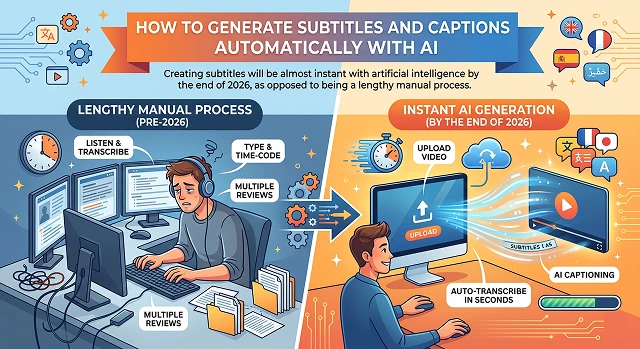
Creating subtitles will be almost instant with artificial intelligence by the end of 2026, as opposed to being a lengthy manual process. AI in 2026 will have evolved greatly from simply "hearing" the spoken word, to understanding the context of what is being said, distinguishing between various speakers and translating into dozens of languages at the same time.
1. The Process of How AI Works to Create New Content
Before hitting "Generate," the AI does 3 significant tasks:
- Denoising: It removes noise from the sound files, separating the voice from background noise such as wind, music or traffic.
- Acoustic Modeling: It breaks down the sounds into “phonemes” (the smallest unit of sound possible) and matches them to words.
- Linguistic Context: This is where the “smart” comes in. For example, if you say "Their house is over there," the AI understands based on context which of the two “there” or “their” it should use instead of guessing.
2. Work Flow: How the Process Works - Step by Step
Run your video through either Professional editing software, Such as Adobe Premiere Pro (for creating videos) OR Casual quick video editor (for mobile apps) – Example would be CapCut, VEED. Either way there will be common Steps you will follow:
Step 1 – Upload Your Video
Just put the video clip into the editing App. Typically, today’s AI editing platforms can transcode, (convert) a 10 minute video in less than a minute, and very often between 30-60 seconds.
Step 2 – Generate Text from Audio
When the video loads in your editing tool, look for a button called "Auto-Captions” or “Transcribe” and click it.
- Pro-Tip: Most software today have “Speaker-Diarization”. This means when there are two people talking, it will automatically label each voice with a tag indicating which is Speaker #1 and Speaker #2.
Step 3 – Revise & “Manually Polish”
Even though AI can produce text of high quality with lesser than 100% accuracy, you need to look for:
- Proper Noun: unique last names or brand names.
- Punctuation: Sometimes AI doesn’t catch the emotion (aka “energy”) of a question or exclamation.
- Timing: Check for proper timing of each subtitle on-screen — typically editors will allow you to “drag” a subtitle item horizontally on the timeline to adjust for timing.
Step 4 – Give Your Titles a “Social Media” Feel
In the year 2026 a subtitle title will not just be white text! Below are some options:
- Karaoke Style: Words will illuminate as said one at a time.
- Dynamic Movement: Words will jump or change colour (an extremely effective method on TikTok/Reels).
- Position: Move up the title(s) if the information contained at the bottom of the screen is important for viewers.
Step 5 – Exporting (The Two Ways)
- Burned-In Subtitles (Hardcoded): These will be permanently added to the video so viewers will not have the option to turn them off. This is the best choice for exporting to Social Media.
- SRT/VTT File (External): An external subtitle file will be provided and must be uploaded along with the corresponding video on YouTube/LinkedIn.
Best Tools for the Job (2026)
| Tool | Best For | Key Vibe |
|---|---|---|
| CapCut | Reels / TikTok | Viral, flashy, high-energy styles with one tap. |
| Sonix / Rev | Professional / Legal | Extremely high accuracy (99%) and secure for sensitive data. |
| Adobe Premiere | Pro Video Editors | Integrated directly into a professional editing timeline. |
| VEED.io | Browser-based | Fast, easy, and works on any computer without installing software. |
| Descript | Podcasts | You edit the video by editing the text transcript (like a Word doc). |
Submit Your Application
Complete the form below to initiate your AI video generation project.
How the "Magic" Works: ASR Technology
ASR (Automatic Speech Recognition) is what provides the engine behind this technology and provides real-time capabilities from the neural transducers that will be utilized in the year 2026 to process audio in real time.
- Feature Extraction: The AI looks at the "wave" of your voice. It filters out humming fans or clinking coffee cups.
- Acoustic Mapping: It compares your voice patterns against a massive database of millions of hours of human speech.
- Language Model: This is where the AI "guesses" the next word based on probability. If you say "Artificial," there is a 90% chance the next word is "Intelligence."
Subtitles vs. Closed Captions (The Human Difference)
Although most of us use the terms subtitles and closed captioning interchangeably, the way artificial intelligence does is different
- Subtitles: Assume the user is capable of hearing but may not understand what they are hearing in the same language as they speak; in this case, AI will process the audio portion of the input only.
- Closed Captions (SDH): Assume that those using closed captions are unable to hear anything. Therefore, in addition to processing the audio portion of the input, the AI will need to be set to also process [Atmospheric Sounds] - such as [Tense Music Swells] or [Door Slams].
- Pro Tip: Higher-end Artificial Intelligence-based products have a feature called "Environmental Detection," which will automatically tag these types of sounds.
Refining the "Readability" (The 42-Character Rule)
AI tends to create long strings of text. Humans, however, hate reading long sentences on a video.
- CPL (Characters Per Line): Professional standards suggest a maximum of 42 characters per line.
- The AI "Chunking" Feature: Most tools now have a slider for "Chunk Size." If you set it to "Short," the AI will break the text into 1–3 words at a time (great for fast-paced TikToks). If you set it to "Long," it provides stable blocks of text (best for documentaries).
The ‘Style Transfer’ Revolution
You can now generate your own typography with A.I. in 2026 by using the Style Transfer capability; No more searching through fonts manually.
- Brand Cohesion: Your brand's website can be uploaded; The AI will then analyze the fonts/environmental color of the website. As a result, A.I. will automatically change your captions’ font and color so they will match.
- Emotionally Colored: Some of the A.I. can determine how you sound, (i.e. are you happy or sad, etc?) Captions created from your voice will reflect how you sound. A bright yellow caption would reflect happiness and a pulsating red caption would reflect an this is serious type of caption.
AI Subtitles & Captions
Make your content accessible and engaging with zero manual typing.
The AI uses Automatic Speech Recognition (ASR). It "listens" to audio frequencies and matches them against massive language databases. It’s smart enough to understand accents and filter out background noise to find the exact words being spoken.
Absolutely. Once generated, you can choose from dozens of Cinematic Presets. Change colors to match your brand, add "glow" effects, or use "karaoke-style" highlights where words light up as they are spoken.
Yes, our AI is multilingual, supporting over 50 languages. You can even use the "Auto-Translate" feature to generate English subtitles for videos spoken in Hindi or Spanish, helping you reach a global audience instantly.
Burned-in captions are part of the video file—essential for social media. SRT files are separate files for platforms like YouTube so viewers can toggle them. Our tool allows you to export both formats.
Usually less than 30 seconds for a 1-minute clip. While manual transcribing would take 10–15 minutes, the AI "reads" the entire audio file simultaneously, delivering a full transcript nearly instantly.
Yes. We provide a Real-Time Editor. If the AI mishears a specific brand name or technical term, just click the word to correct it. The timing remains perfectly synced even after your edits.
Huge! Search engines read your captions to understand your video. By including them, you’re providing a text map of your content, which significantly helps your video show up in more relevant search results.
Ready to try Hedra?
Transform your ideas into cinematic video in seconds.