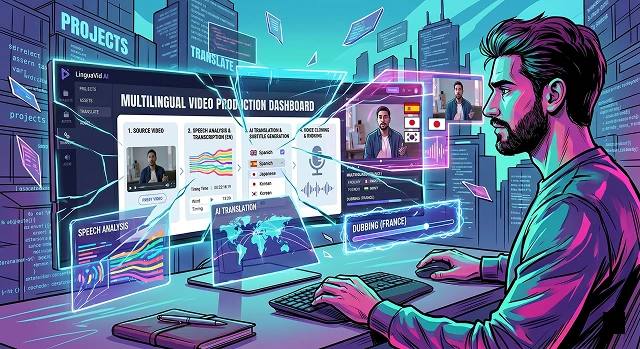
Creating multilingual videos used to require an army of voice actors, translators, and video editors. Today, AI can handle the entire pipeline—translating your script, cloning your voice into another language, and even sync’ing your lip movements—in just a few clicks.
The 3 Main Approaches to AI Video Translation
You may choose from three different options depending on what you can afford and how real you want the video to appear.
- The Budget Route (Subtitles Only): The video and audio remain in the original language, but AI produces translated captioning for the video.
- The Voiceover Route (Audio Dubbing): AI translates the speech and creates a synthetic voiceover (or clones your voice), but the person's mouth in the video doesn't match the new language.
- The Hollywood Route (Full Lip-Syncing): AI translates the audio and magically alters the speaker’s mouth movements to match the new language perfectly.
Complete Process to Translate Your Video Step-by-Step
If you want the highest quality results with both Audio Dubbing and Lip Sync, follow these steps using a Complete Solution such as HeyGen or Rask AI.
Step 1: Prepare Your Source Video
Make sure the original video is clean (before you upload anything to an AI tool).
- Background noise will make it difficult for AI to extract your voice from the source audio.
- Articulate well and talk slowly.
- When using lip-syncing software, avoid using fast cuts or quick transitions when you're speaking!
Step 2: Upload and Select Languages
- Enter the AI video translation site you want to use. You need to upload your video (or YouTube and/or Vimeo address) to the service in order for it to translate; this means providing what is called your "source" language (the language in which the video speaks) as well as your "target" language (the language you want the service to convert your video into). Most video conversion services have more than 30 languages including Spanish, Mandarin, French, German, and Hindi supported sitewide.
Step 3: Editing the Transcribed Text (Important Step!)
- AI will transcribe your video and then will also translate it. You must review the transcribed text before generating new audio! (Why? Because the AI mishears a lot of brand names, slang, or specialised terms.) If the transcription is incorrect it will create an incorrect translation. Make sure to fix all typos in original text prior to giving the AI permission to make new audio.
Step 4: Clone Your Voice or Choose an Actor
Two options are available for the audio:
- Voice Cloning: The AI learns your actual voice for approximately ten seconds to build a digital copy that can converse in another language but with your distinctive likeness, including tone and inflection.
- Stock AI Voice: You can choose from a catalogue of professional voice actor profiles, including "Warm, Male Narrative" or "Energetic, Female Marketing."
Step 5: Start Lip Synchronization and Creation
- When you have finalized your text and audio settings, click on the Lip-Sync or Video Translate checkbox. The AI will analyse your video frame by frame and change the geometry of your mouth to conform to the new words or phrase being said. This will generally take a few minutes depending on how long the video is.
Step 6: Check & Download
- View your video after translation and see if there are any "strange twilight" moments with strange mouth movements – if not, then you are ready to export your video at 1080p or 4K resolution.
Top AI Tools for the Job
No-Code Implementations · No-Code Platforms Guide
| Tool Name | Best For | Key Feature |
|---|---|---|
| HeyGen | Full Lip-Sync & Realism | Incredible voice cloning and terrifyingly accurate mouth-re-mapping. |
| ElevenLabs | Studio-Quality Audio | The absolute gold standard for natural-sounding AI voices and emotional tone. |
| Rask AI | All-in-One Localization | Great for long-form videos and distributing to platforms like YouTube and TikTok. |
| CapCut / Premiere Pro | Quick & Cheap Subtitles | Auto-captions and basic translation directly inside your video editor. |
Submit Your Application
Complete the form below to initiate your AI video generation project.
Choosing Your Weapon: Detailed Tool Breakdown
The AI landscape features a few clear leaders, each specializing in a different type of video asset:
1. HeyGen: The Visual King
- Best For: Marketing videos, social media, talking-head videos, and course creators.
- The Good: Supports over 175 languages. Its "Live-Sync" technology is widely considered the absolute best for making mouth movements look 100% real without losing your natural skin texture or lighting.
- The Catch: It is heavily designed around single-speaker talking heads. If your video features people moving around rapidly, or cinematic camera angles, the lip-sync can sometimes look distorted.
2. Rask AI: The Multi-Speaker Specialist
- Best For: Podcasting, interviews, talk shows, and panel discussion formats.
- The Good: While many other Ai tools fail when multiple people speak simultaneously; Rask utilizes Spatial Audio Separation technology to identify each speaker's unique voice, isolate each speaker and create their unique clone in the target language.
- The Catch: Their premium visual lip sync is available only at a higher Subscription Tier, plus they charge per minute, so costs can exceed quickly when producing long podcasts.
3. ElevenLabs Dubbing Studio: The Cinematic Master
- Best For: High-production marketing, documentaries, movie clips, and video games.
- The Good: No one beats ElevenLabs for raw audio quality. It transfers emotional undertones—like whispering, laughing, excitement, or anger—seamlessly into the target language.
- The Catch: It focuses almost entirely on the audio side. It does not natively alter the mouth movements on the video. You get a perfect voiceover, but the lips won't match.
Professional Level Blueprint: Outline for Safe and Secure Video Translation Workflow
This is your production pipeline towards a perfect video with a natural feel; nothing will resemble a bad dubbing.
Phase 1. Recording the Source Material (Garbage In, Garbage Out)
AI cannot fix a fundamentally messy video. If you plan to translate your video later, record it with these constraints:
- The 70/30 Rule: The 70/30 Rule is really important. We need to leave some space for silence. When we talk we should do it a little slower than we normally do. Some languages like Spanish, French and German need words to say the same thing as English. This is because Spanish, French and German use around 20 to 30 percent syllables than English. So if we use many words, in our English video the Spanish audio will have to be sped up by the artificial intelligence system. This applies to French and German videos as well because they all need a bit more time to get the message across.
- Framing: Keep your face fully visible to the camera. Avoid putting your hands in front of your mouth while talking, as this breaks the lip-sync tracking.
Phase 2: The Script Polish
Once you upload your video to a tool like HeyGen or Rask:
- Freeze: Do not hit generate immediately. Look at the text transcription.
- Correct the Source: Clean up any acronyms or brand names (e.g., if you said "AI," ensure it didn't write "eye").
- Check the Cultural Translation: Look at the translated text. If you used an idiom like Cultural Translation for example "We hit a home run with this project" you should manually change the Cultural Translation in the target language to something that makes sense to the people of that culture like "We achieved success with this Cultural Translation" rather than letting the AI literally translate a baseball term to a country where the people only watch soccer. This is important, for Cultural Translation because it helps to make sure that the people who read the translated text will understand what you are trying to say with the Cultural Translation.
Phase 3: Fine-Tuning and Mastering
- Dialect Selection: When it comes to Dialect Selection do not just choose Spanish. You need to pick Spanish or Castilian Spanish depending on the people you are talking to. The Artificial Intelligence system changes the words and the way people speak entirely based on this choice.
- Multi-Track Exporting: This means you can export the translated audio and the translated subtitles as files. This gives you the freedom to move the captions around inside your video editor later which's really helpful. You can work with the translated audio and the translated subtitles separately which makes things easier.
Global Reach: AI Translation
Break language barriers and speak to the world with automated dubbing.
It’s a neural three-step process: First, the AI transcribes your speech. Second, it translates the text contextually. Finally, it uses Voice Cloning to generate audio that sounds like you, but in a new language. It’s a digital polyglot twin of your own voice.
Yes, via Visual Lip-Sync (Lip-Dubbing). Modern tools don't just swap audio; they procedurally re-animate your mouth movements to match the translated phonemes. This eliminates the "desynced" look, making the performance appear natural in any target language.
AI translation in 2026 reaches 98% accuracy for major global languages. While slang and niche jargon can vary, most tools provide a "Human-in-the-loop" editor, allowing you to proofread and tweak the translated script before the final audio is baked in.
Premium engines now support over 75 languages including regional dialects. You can produce a single video and localized versions for Hindi, Spanish, Mandarin, French, and Arabic in a single afternoon, effectively launching a global brand instantly.
This is made possible through Prosody Transfer. Modern AI doesn't just swap words; it maps your original pitch, cadence, and emotional intensity. If you sound enthusiastic in the source video, the dubbed version will carry that exact same energy.
Yes! In-Video Text Translation allows the AI to detect background text (like slides or signs), erase the original pixels, and replace them with translated text in the same font style. This creates a fully immersive localized experience.
Cultural Localization. Don't just translate word-for-word. Tweak your "hook" or core jokes to include local references. A small cultural adjustment in the script can be the difference between global silence and a local sensation.
Ready to try Hedra?
Transform your ideas into cinematic video in seconds.