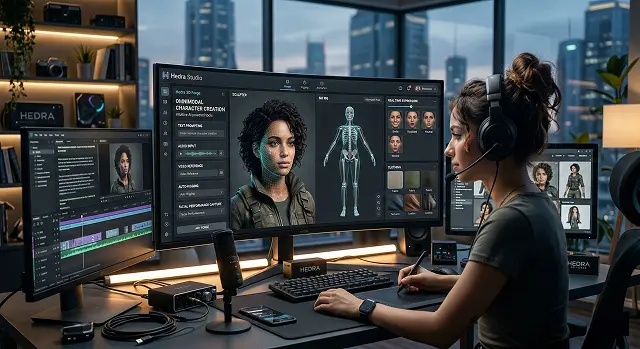
The way we build 3D characters is changing fast. If you’ve been following the updates in 2026, you know that the old, tedious process of manual rigging is finally starting to fade into the background. With Hedra’s latest Character-3 model, we’ve moved into this "omnimodal" era where everything—the voice, the facial movement, and the emotion—happens all at once. It’s a massive time-saver, but there's still a bit of an art to getting it right.
I’ve found that the secret to a great result starts long before you hit the "generate" button. You really need a solid visual foundation. I usually stick with the built-in generators like Flux or Nano Banana Pro to get my base image.
The big tip here is to keep the face clear. Even though the AI has gotten way better at handling stylized or non-human avatars lately, you’ll still get the most realistic lip-syncing if the facial features are easy for the model to "read." Also, keep your final platform in mind: go square for headshots, but if you’re planning to post to social media, definitely stick with a vertical 9:16 crop.
1. Conceptualization and Base Image Generation
Before opening the 3D Forge, you need a high-quality visual foundation.
- The Prompting Phase: Use Hedra’s integrated image generator (powered by models like Flux or Nano Banana Pro).
- Best Practices: Ensure your character has clear facial features. While early AI struggled with non-humans, the 2026 update allows for stylized avatars, though "humanoid" features still yield the most stable lip-syncing.
- Aspect Ratio: Choose 1:1 for headshots or 9:16 for social media-ready vertical characters.
2. Setting Up the 3D Forge
Once your image is ready, move into the Studio dashboard.
- Upload/Select: Import your generated image or a custom character photo.
- The "Omnimodal" Advantage: Unlike older tools that required you to generate a video and then add audio, Hedra’s 3D Forge processes Image + Audio + Text simultaneously. This ensures the "mesh" of the face deforms naturally with the specific phonemes of the speech.
3. Audio and Voice Integration
A high-quality character is nothing without a believable voice.
- Voice Selection: Use the Premium Voice Library or upload a custom clip.
- Voice Cloning: If you have the "Creator+" tier, you can clone your own voice using just three recorded lines.
- Language Support: Hedra supports over 140 languages. The AI automatically adjusts the character's mouth "weighting" to match the specific dialect or accent chosen.
4. Enhancements with “Hedra Elements”
As of 2026, Hedra Elements enables you to further create your character beyond the original performing prompt.
- Modular Layers allow you to switch out different outfits (changing a character from Cyberpunk to Business Casual), along with changing up the character’s environment without having to regenerate the entire character face.
- Emotion Control is made possible by Motion Control sliders which dictate a character’s base mood from Highly Expressive and Joyful to Serious and Monotone.
5. Exporting/Prepare for Game Workflow
If you are an indie developer or animator who wishes to take your character into a 3D Engine:
- Mesh/Topology: The 3D Forge creates a decimated mesh (“Game Ready”) but you can also use AI Retopology to obtain professional-grade topology for your vertices flows for smoother movement in other such as BLENDER or UNREAL ENGINE.
- Resolution: You have the option to export at either 720p or 1080p; one way that many 2026 users achieve higher quality is by passing their final output through an upscaler such as the "Super Genius" (to obtain 4K).
| # | Forge Phase | Creation & Implementation |
|---|---|---|
| 01 | Mesh Initialization | Setting the base topology using Hedra's latent 3D sculpting tools to define character proportions. Geometry Start |
| 02 | Texture Synthesis | Applying procedural PBR materials to the character surface for physically accurate light interaction and realism. |
| 03 | Rigging & Kinematics | Automated skeletal mapping to ensure fluid, natural movements during the AI-driven animation phase. Temporal Rigging |
| 04 | Lighting Calibration | Simulating global illumination to ensure the character blends into various "The Void" environments seamlessly. |
| 05 | Final Rendering | Exporting the character in high-fidelity formats ready for integration into your premiere video project. |
Submit Your Application
Complete the form below to initiate your AI video generation project.
The “Golden Rule” for source imagery says that the vast majority (90%) of the quality of your 3D output relies on the base image. Avoid the “Uncanny Valley” by using these guidelines when creating a “High Quality” result:
- 1. Three-quarter View: The best views for generating an AI-based 3D projection are those that have a slight three-quarter turn to add depth; the front facing is the simplest.
- 2. Consistent Lighting: Avoid troublesome hard directional shadows (use a flashlight from below). Use soft/hard cinematically oriented lighting to better approximate the base image geometry of the nose and/or cheekbones to aid 3D Forge’s ability to interpret due to either shadow or lighting.
- 3. Neutral mouth: Using an image where the character has an open mouth will create problems with lip sync mapping, thus creating “mushy” output.
Using Advanced Animation Techniques in 3D Forge
1. The “Emotion Layering” Workflow
Instead of only typing a script use the Hedra Emotion expression markers, which enable you to program control the micro-expression of the AI via your text-to-speech script.
- [smile] causes the corner of the mouth to turn up gently
- [surprise] causes the eyes to open wider and the eyebrows to raise
- [nod] gives a subtle affirmation through slight movement of the head
2. Audio-Driven Kinematics
If you want your character to look human, do not use flat AI voices. * Breath and Pauses: High-quality characters need "non-verbal" cues. If you upload an audio file with audible breaths, sighs, or laughter, Hedra’s 3D Forge will sync the chest and shoulder movement to those sounds.
- Pitch-to-Motion: The system uses the pitch of the audio to dictate head tilts. Higher pitches often trigger a slight upward tilt, while lower tones bring the chin down, mimicking natural human speech patterns.
Hedra's 3D Forge: Character Creation
Master the art of generating high-fidelity, production-ready 3D characters.
Start with the Base Mesh Generator. Provide a detailed prompt describing species, age, and silhouette. The Forge generates a T-pose model that serves as the foundation for texturing and rigging.
Leverage Hedra’s Neural Material Mapper. Specify materials like "pore-detailed skin" or "weathered leather" to generate 8K PBR maps including Albedo, Normal, and Roughness.
Yes. The Forge features Auto-Rig Pro Integration, which applies a full skeletal hierarchy automatically. This makes your character immediately compatible with motion capture data.
Absolutely. 3D Forge supports FBX, GLB, and USDZ. All exports maintain vertex weights and material assignments for seamless import into major game engines.
Use the Morph Target Slider. This allows you to fine-tune 52 standard ARKit blendshapes, ensuring your character expresses complex emotions and syncs perfectly with audio.
Use the LOD (Level of Detail) Decimator. Choose presets like "Cinematic" or "Mobile." The AI removes edge loops while preserving the silhouette and UV mapping integrity.
Yes. The Strand-Based Grooming module allows you to prompt for hairstyles. The Forge generates hair as separate geometry cards or splines for high-end rendering.
The Forge generates a Thickness Map. This tells engine shaders where light should "glow" through thin areas like ears, creating a lifelike appearance.
Yes. Use Concept-to-Mesh. Upload your 2D character sheet, and the AI will extrude geometry and project textures to create a 3D match of your artwork.
Using Slot-Based Swapping, you can isolate the "Head" geometry and re-roll the clothing prompt. This maintains 100% facial identity while changing outfits.
Ready to try Hedra?
Transform your ideas into cinematic video in seconds.