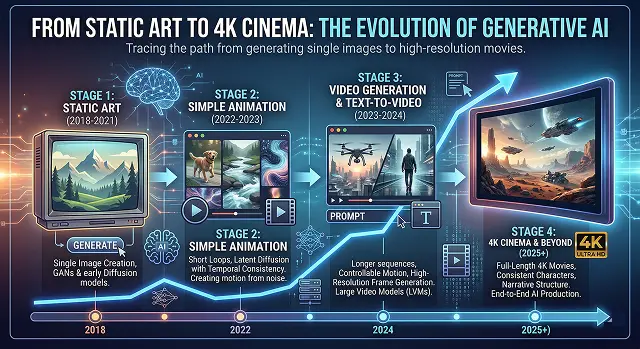
The transformation from static art to the movie market of 4K Cinemas—neither of which exsists as an official movie title—describes how generative ai has evolved. Furthermore, the key evoluational steps to reach this point of generating 4K videos and movies will be described below:
1. The Process of Creating Content
The process of creating content starting from one image and turning it into video has gone through multiple processing phases:
- Static Artwork (image generation): Examples of models like Midjourney or Dall e 3 are all examples of generating static artwork as a starting point. This part of the process is primarily based on creating a composition, lightening, and “prompt engineering” the best possible frame.
- The "In between" (temporal): The static artwork can now be animated by using tools to create/guess what frames will be generated for the period of time in between two frames or the time that it takes to transition from one frame of animation to the next, which is a) prediction of frame “movement as well as b) ensuring temporal consistency (for example, an individual's facial features must not be overly changed from frame to frame).
- Upscaling the resolution of the video 4K: Most AI Video Models generate low-resolution pixels (720p) in order to conserve processing power; creating 4K resolution video content is created via using AI Upscalers like Topaz Video AI. AI Upscalers use neural networks to calculate an entire pixel that has not been generated or an entire pixel that was generated by the models, thus allowing for optimum sharpness and clarity.
| ID | Phase | Cinematic Workflow & Tools |
|---|---|---|
| SC-01 | Foundation |
Creating the base character and environmental setting using advanced image generation models.
Midjourney, Flux.1 |
| SC-02 | Animation |
Adding realistic movement, character physics, and precise lip-syncing to the static art.
Hedra, Kling, Pika |
| SC-03 | Expansion |
Extending clip duration and maintaining temporal consistency across multiple frames.
Luma Dream Machine |
| SC-04 | Polishing |
Final upscaling to 4K resolution and professional color grading for a theatrical finish.
Topaz Video AI, DaVinci Resolve |
2. Why This Matters Now
The move towards "4K Cinema" indicates a significant development on the road towards artificial intelligence.
- Accessibility of visual storytelling: It will now be possible for anyone to make films that have high production values, rather than those being limited to 'Hollywood' studios with huge budgets.
- Speed: The amount of time taken to create a cinematic shot from an idea (via a text prompt) has decreased from months to minutes.
- Consistency in character 'glue': Newer generation models are much better at maintaining “character glue” when shooting different shots with the same subject (person or object).
3. The "DNA" (Static Art)
The first step in creating your character or environment for the AI to recognize is to provide it with only one great high resolution image, referred to as your "Static Art".
- The Goal: The intention for this image is not just to create a "nice image" but rather to develop a character/world with enough detail (depth, texture and lighting) for the AI to comprehend.
- The Human Touch: You will take on the role of Director, determining the color scheme and overall "feel" of the character/world before actually animating any part of it.
Submit Your Application
Complete the form below to initiate your AI video generation project.
4. Giving it a Pulse (Animation)
This is the "magic" step. You take that static image and feed it into an animation model.
- Movement: The AI looks at your picture and the algorithm determines what motion will occur next in the picture. If your picture is of a person, it will animate their hair and/or eyes to create realistic movement.
- Talking (Lip-Sync): If you provide an audio file, tools like Hedra will actually "rig" the face of your drawing so the mouth moves perfectly in time with the words, including micro-expressions like blinking or tilting the head.
5. Extending the Story (Expansion)
Most AI video clips start very short (usually 3–5 seconds).
- The "Glue": To make a "Cinema" experience, you need longer shots. "Expansion" tools look at the end of your first 5-second clip and generate the next 5 seconds so the character doesn't suddenly change into someone else. This creates a continuous flow.
6. The Professional Polish (4K Cinema)
Raw video created using artificial intelligence is frequently blurry, otherwise known as ‘noisy’, resulting in a low resolution image. The purpose of upscaling raw A.I. video to a ‘4K Cinema’ quality is done via an A.I. digital carwash:
- Upscaling: The specialised A.I. identifies the blurry pixels, then redrafts them to become 4 x their original size, and enhances detail in things such as the eyes, skin pores, and texture of clothing.
- Colour Grading: Used predominantly in the film industry, colour grading is the process of altering the colours in the video to produce different visual effects.
7. The Foundation: "Neural Photography"
It starts with a high-fidelity image (Static Art). In this stage, you aren't just generating a picture; you are creating a Visual Anchor.
- Prompting for 4K: You use specific "optical" prompts. Instead of just saying "a man in a forest," you specify lens types (e.g., 35mm anamorphic), lighting (e.g., volumetric god rays), and texture detail (e.g., subsurface skin scattering).
- The Model: Tools like Flux.1 or Midjourney v7 generate images with enough "pixel data" that the animation models don't have to "guess" as much, reducing those weird AI glitches (hallucinations).