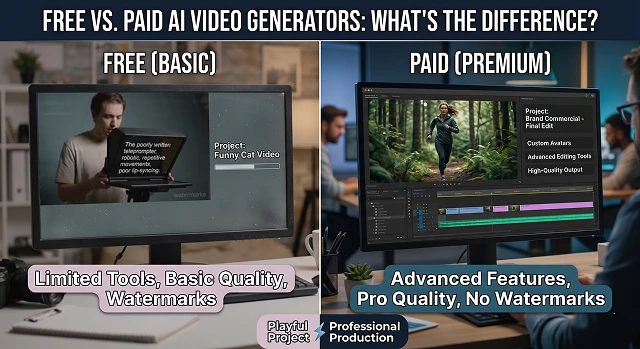
The field of artificial intelligence video production is evolving rapidly. Although one can produce a video using an algorithm for free, the distinction between a free software program and a paid subscription generally lies between a playful project and a professionally produced video.
Below is a list of the most significant distinctions in layman’s terms.
1. Watermarks and Branding
The most obvious difference is the "stamp" on your video.
- Free: Almost every free AI tool adds a large watermark (like the company’s logo) in the corner or center of your video. This makes it difficult to use for professional business presentations or social media ads.
- Paid: Paying for a subscription removes these logos, giving you a "clean" file that looks like you produced it yourself.
2. Video Length and Resolution
- Free: You will often be restricted to short clips that last only between 3 to 10 seconds. This content may have low-definition (HD), which could look poor on larger screens.
- Paid: Longer videos that last minutes instead of seconds can be generated, and you can even download it in high-definition or 4K resolution.
3. Processing Speed (The "Queue")
AI video requires massive amounts of computer power.
- Free: You are at the back of the line. Your video might take 20 minutes or even an hour to "render" because the servers prioritize paying customers first.
- Paid: You get "Priority Processing." Your videos usually start generating instantly and finish in a fraction of the time.
4. Commercial Rights
This is a big legal trap many people miss.
- Free: Most free versions come with a "Personal Use Only" license. This means you can show it to your friends, but you cannot legally use it to make money, put it in a YouTube video you monetize, or use it for a client's project.
- Paid: A subscription usually grants you a commercial license, meaning you own the rights to the output and can use it for business and profit.
5. The "Credit" System
Most AI platforms use a "token" or "credit" system.
- Free: You might get 30 credits a month. Since one video often costs 5–10 credits, you might only get to try 3 or 4 ideas before you are locked out until next month.
- Paid: You get a much larger bucket of credits (e.g., 500 or 1,000), allowing you to make mistakes, experiment, and refine your video until it’s perfect.
Free vs. Paid Versions
Feature Access · Service Comparison Table
| Feature | Free Version | Paid Version |
|---|---|---|
| Watermark | Always present | Removed |
| Duration | 3–5 seconds | Up to several minutes |
| Quality | Low (720p or less) | High (1080p or 4K) |
| Usage Rights | Personal use only | Commercial/Business use |
| Speed | Slow (Waiting in queue) | Fast (Priority access) |
| Support | None/Community | Priority Email/Chat |
Submit Your Application
Complete the form below to initiate your AI video generation project.
The "Model Version" Gap
In the year 2026, most organizations utilize a “tiers of intelligence” approach.
- Free: Most of the time, you will have access to the “lite” or “previous generation” versions (such as Runway Gen-3 or Sora 1). These models are awesome but cannot comprehend complicated physics, like walking without the legs getting entangled or realistic fluid dynamics.
- Paid: You get the "Turbo" or "Pro" models (e.g., Runway Gen-4 or Sora 2). these use significantly more computing power to ensure that human anatomy stays correct and the "physics" of the world (gravity, lighting, reflections) look real.
Creative Control (The "Director" Tools)
The biggest frustration with free AI video is that it’s a "slot machine"—you pull the lever and hope for the best. Paid versions give you the steering wheel.
Paid-Only Features:
- Motion Brushes: Simply paint the area in a still image (say, a hand or clouds), and instruct the AI system to make the area move.
- Camera Motion: Sliders with precision control to “Dolly In 20%” or “Pan Left Speed 5.” Typically, free versions will just add a random camera motion.
- Character Consistency: This is the "Holy Grail." Paid tiers often allow you to upload a "reference face" so the same person appears in every clip you generate. Free versions will give you a different-looking person every time.
Audio & Lip-Syncing
Video is only half the battle; the other half is what you hear.
- Free: Usually produces "silent films." If you want sound, you have to find it yourself and edit it in later.
- Paid: Most pro tiers now include Auto-Foley (the AI hears a car in your video and automatically generates the engine sound) and Lip-Syncing. You can upload a voice clip, and the AI will perfectly match the character's mouth movements to the words.
Commercial Safety & Ethics
This is the boring but "must-know" stuff for businesses.
- Free: Often uses "wild" data for training. If the AI accidentally generates something that looks too much like a copyrighted movie character, you (the user) might be legally exposed.
- Paid: Top-tier plans (like Adobe Firefly Video or Getty AI) offer Commercial Indemnification. This is essentially "legal insurance"—the company promises that their AI was trained on licensed photos/videos and they will defend you in court if there's ever a copyright claim.
Resolution & "Upscaling"
AI-produced videos usually start off small and "fuzzy."
- Free: You have access to the “raw” video, which may be at 480p or 720p quality level. When played back on a large television or movie screen, your video will be equivalent to that shot on a home video camera from the nineties.
- Paid: The inclusion of AI upsampling technology. This means the software will re-imagine the details from the 720p resolution video and render it as high-resolution 4K with added features such as pore-like or weave textures.
Free vs. Paid AI Video
Deciding whether to stick with the basics or unlock the full potential.
Usually, yes. Free versions often limit you to 720p resolution, which looks fine on phones but can appear blurry on bigger screens. Paid plans unlock 4K rendering and higher bitrates, giving your videos that crisp, professional finish seen in high-end content.
When thousands of people generate videos at once, free users are often placed in a waiting line. Paid users get "Priority Rendering," meaning your video processes immediately. If you're working on a tight deadline, this speed difference is a massive lifesaver.
This is the most common reason for upgrading. Free tiers often include a "Made with AI" brand logo. Upgrading to a paid plan gives you White-Label rights, allowing you to export clean videos that look like you custom-built them from scratch.
Yes. Paid plans usually unlock advanced tools like Motion Brushes, Camera Controls, and Character Consistency. These features let you act as a "Virtual Cinematographer," giving you the precision needed for professional storytelling.
To use AI videos for business ads or client work, you need a Commercial License. Free versions are typically restricted to "Personal Use Only." Paid plans grant you the legal right to use those videos to generate profit and grow your brand.
Most platforms have usage-based refund policies. Because AI generation costs significant computing power, once you've used a certain amount of credits, a refund is often not possible. We recommend testing the Free tier thoroughly first.
If you're a hobbyist, the Free version is amazing. But if you're a Content Creator or Marketer, the Paid version pays for itself through time saved, higher quality, and the professional look of clean, unbranded videos.
Ready to try Hedra?
Transform your ideas into cinematic video in seconds.