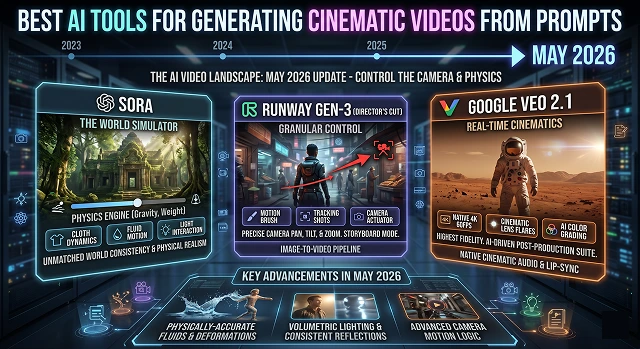
The AI video landscape has moved incredibly fast. As of May 2026, the "best" tool isn't just about who makes the prettiest picture—it's about who gives you the most control over the camera and the "physics" of the scene.
Here is the breakdown of the top AI tools for generating cinematic videos from prompts, explained in plain English.
1. Runway Gen-4 (The "Professional’s Choice")
Runway has long been the gold standard for filmmakers. Its latest models focus on precision.
- The Vibe: It feels like having a digital movie set. You don’t just "hope" for a good shot; you direct it.
- Cinematic Feature: Motion Brush. You can paint over a specific area (like a flowing river or a character’s eyes) and tell the AI only to move that part.
- Best For: Short films and high-end commercials where you need the lighting and "camera" movement to be exact.
2. Google Veo 3.1 (The "Realism King")
For photorealism, there is no better option than Google’s Veo. When you need a video that looks as if it was recorded with a high end 4k camera versus generated via computer then Google’s Veo is your only choice.
- The Vibe: Exceptionally stable. While other AI videos sometimes "melt" or glitch, Veo’s physics (how hair moves, how light bounces) are remarkably consistent.
- Cinematic Feature: This tool has an advanced level of understanding of film technical jargon (ex. 180 degree shutter, bokeh and tracking shot). Compared to most other tools, it will understand these terms far better.
- Best For: Nature documentaries, product videos of high quality, and b-roll video.
3. Luma Dream Machine (The "Action Director")
Luma is famous for dynamic motion. If you want a fast-paced car chase or a first-person view of someone running through a forest, Luma handles high-speed movement without the blur turning into a mess.
- The Vibe: Fast-pacedness with "hand-held" camera perspective, making the viewer feel like they're part of the action.
- Cinematic Feature: Keyframe Control - allows you to upload a starting and ending picture, and AI will "imagine" the motion of the camera throughout all the frames in between.
- Best For: Action sequences and "vibe" clips for social media.
4. Kling 3.0 (The "Long-Form Master")
While most AI generators limit you to 5 or 10 seconds, Kling (from ByteDance) pushed the boundaries by allowing generations up to 2 minutes long in high quality.
- The Vibe: Smooth and narrative. It is particularly good at "human" movements—eating, walking, and complex facial expressions—which are notoriously hard for AI.
- Cinematic Feature: Advanced Physics Interactions - Improved Object to Object interaction and realism (like a hand picking up a glass) with minimal glitches.
- Best For: Narrative-based scenes that last longer than a few seconds.
Comparison at a Glance
AI Video Generation · Platform Overviews
| Tool | Strongest Suit | Learning Curve | Best Use Case |
|---|---|---|---|
| Runway | Camera Control | Moderate | Professional Film/Ads |
| Google Veo | Visual Fidelity | Easy | Photorealistic B-Roll |
| Luma | Physics & Motion | Easy | Action/Dynamic Scenes |
| Kling | Video Length | Moderate | YouTube/Narrative Shorts |
Submit Your Application
Complete the form below to initiate your AI video generation project.
5. Runway Gen-4.5 (The "Director’s Choice")
Runway remains the industry leader because it treats you like a director, not just a prompter.
- The Vibe: High-end, professional, and precise.
- Key Cinematic Feature: Multi-Camera Control. In 2026, Runway allows you to generate the same scene from different "camera angles" (like a wide shot and a close-up) while keeping the characters and environment exactly the same.
- Why it’s "Cinematic": It has the best Character Consistency tool. You can lock in a character’s face and clothes so they don't "shape-shift" between clips.
6. Pika 2.5 ((The "VFX Specialist")
Pika established itself as the best creative and entertaining tool, with an emphasis on creating effects that do not obey the laws of physics.
- The Vibe: The type of creative work produced by Pika features bright, vibrant, and atmospheric styles — this includes work related to Sci-Fi or Fantasy genres.
- The Key Cinematic Feature: Pikaffects. Pikaffects are included physics tools that allow users to "melt," "inflate," or "crush" physical objects within their video with a single button click.
- Why It’s Cinematic: When it comes to creating work based on the Neon or Cyberpunk styles of art, no one else can compete. If you see your video taking place on rain-soaked streets filled with bright lights, you need to use Pika.
The Strategy for 2026: Multi-Model Routing
In 2026, professionals no longer only utilize one tool but essentially treat them as multiple departments would on a film production set.
- The "VFX" Department (Runway Gen-4.5): Used for Multi-Motion Brush work. Creators take a still photo, paint 5 different areas, and give each a different motion (e.g., the car moves left, the smoke rises up, the leaves blow right).
- The "Audio" Department (Google Veo 3.1): Used when the sound is as important as the visual. It is currently the leader in Ambient Sync, where it generates the clinking of glasses or the hum of a city that perfectly matches the video's movements.
- The "Stunt" Department (Luma Ray 3): Used for Extreme Physics. If your prompt involves complex collisions, water splashing against a specific object, or clothing moving in the wind, Luma’s "Ray 3" engine is the most physically accurate.
The New "Open Source" Contender: Wan 2.2
A major shift in 2026 is the rise of Wan 2.2. Unlike the others, which are "closed" websites you pay for, Wan is open-source.
- Why it matters: If you have a powerful PC, you can run it locally for free.
- The Performance: It is shockingly fast. While it might lack the polished "character locking" of Luma, it is currently the king of creative speed—generating high-quality 1080p clips in under 30 seconds.
The "Post-Production" Hybrid
We are seeing the birth of "Edit-by-Prompt."
- Adobe Premiere Pro (2026 Update): Now has Generative Extend built-in. If your real-life camera shot was 2 seconds too short, you can drag the end of the clip, and the AI will "dream" the next 2 seconds of footage to finish the scene.
- DaVinci Resolve 19.5: Features IntelliTrack AI, which allows you to "attach" a prompt-generated effect (like fire or a digital mask) to a moving person with perfect tracking.
Cinematic AI Video Guide
Master the tools that turn text prompts into high-end cinematic masterpieces.
As of mid-2026, Google Veo 3.1 and Wan 2.2 are the heavyweights. Unlike basic generators, these models simulate subsurface scattering and global illumination. They don't just move pixels; they understand how light bounces off skin and glass, giving your shots that high-budget "Arri Alexa" texture.
It’s all in the technical descriptors. To move past the "AI-smooth" look, add "shot on 35mm celluloid," "anamorphic bokeh," or "Kodak Portra 400 color science" to your prompt. Premium engines will then introduce the micro-imperfections and organic noise found in real film stock.
Yes, but avoid generic "slow mo" tags. Use "overcranked 120fps simulation" or "high temporal consistency." Models like Luma Dream Machine 2.0 excel at high-frame-rate physics, ensuring that splashing water or falling debris remains fluid without the "warping" artifacts seen in basic tools.
To trigger the movie-theater effect, always specify a 2.39:1 (Cinemascope) aspect ratio. While 16:9 is standard for TV, the wider horizontal field-of-view combined with "anamorphic lens distortion" prompts immediately signals professional cinematic intent to the viewer.
Pro filmmakers choose Image-to-Video (I2V). Generate a high-detail static shot in Midjourney first to lock in the set design and lighting. Then, use I2V to add "camera kinetic energy" or "subject performance." This workflow offers 10x more control over scene composition than text prompts alone.
Stop using marketing adjectives like "epic" or "stunning." Instead, use technical lighting prompts. Specify "low-key Chiaroscuro lighting," "volumetric fog," or "naturalistic 180-degree shutter speed." The more you speak like a Director of Photography (DP), the more realistic the neural output becomes.
Try this framework: "Extreme close-up macro shot, weathered artisan's eyes, 85mm f/1.2 lens. Soft rim lighting from a side window, dust motes in sunbeams. Cinematic 24fps pacing, slow-motion blink, raw film texture, 4K resolution, neutral color grade."
Ready to try Hedra?
Transform your ideas into cinematic video in seconds.